Local-first AI token visibility for macOS

Keep AI usage, credits, and resets visiblewithout chasing vendor dashboards.

TokenBar lives in your menu bar and gives you a quick way to check usage, credits, resets, and alerts across the AI tools you already use. It is meant to feel simple and glanceable, not like a whole monitoring setup.

Questions before you buy?staff@tokenbar.site
Basic $5 or Pro $10Simple pricingLocal-first on your Mac

Live token view

One menu bar. The numbers stay easy to check.

OpenAIClaudeGeminiSupported apps

TokenBar

A quick usage view that stays close by

Live view

OpenAI usage change

A usage jump shows up right away.

You can catch it before it disappears into a later billing total.

Immediate view

More than one app open

Usage from different tools stays easier to separate.

If OpenAI, Claude, or a supported app are all contributing, the change is easier to read in one place.

One place

What TokenBar helps you notice

The spend stays attached to what changed it.

You should not have to remember which app, tab, or retry caused the jump. TokenBar keeps that answer closer at hand.

Usage jumps

See when the number moves before it turns into a surprise.

Extra retries

Notice repeated requests while the cause is still fresh.

OpenAI logoOpenAI
Claude logoClaude
Gemini logoGemini
Cursor logoCursor
OpenRouter logoOpenRouter
Copilot logoCopilot
Vertex AI logoVertex AI
OpenAI logoOpenAI
Claude logoClaude
Gemini logoGemini
Cursor logoCursor
OpenRouter logoOpenRouter
Copilot logoCopilot
Vertex AI logoVertex AI
OpenAI logoOpenAI
Claude logoClaude
Gemini logoGemini
Cursor logoCursor
OpenRouter logoOpenRouter
Copilot logoCopilot
Vertex AI logoVertex AI
OpenAI logoOpenAI
Claude logoClaude
Gemini logoGemini
Cursor logoCursor
OpenRouter logoOpenRouter
Copilot logoCopilot
Vertex AI logoVertex AI

Product Reveal

Real screenshots, with the popup opening as you scroll.

The stage stays clean. The screenshots stay real, and the popup waits until the section is properly in view before it opens so the motion feels intentional instead of rushed.

Scroll to open the popup
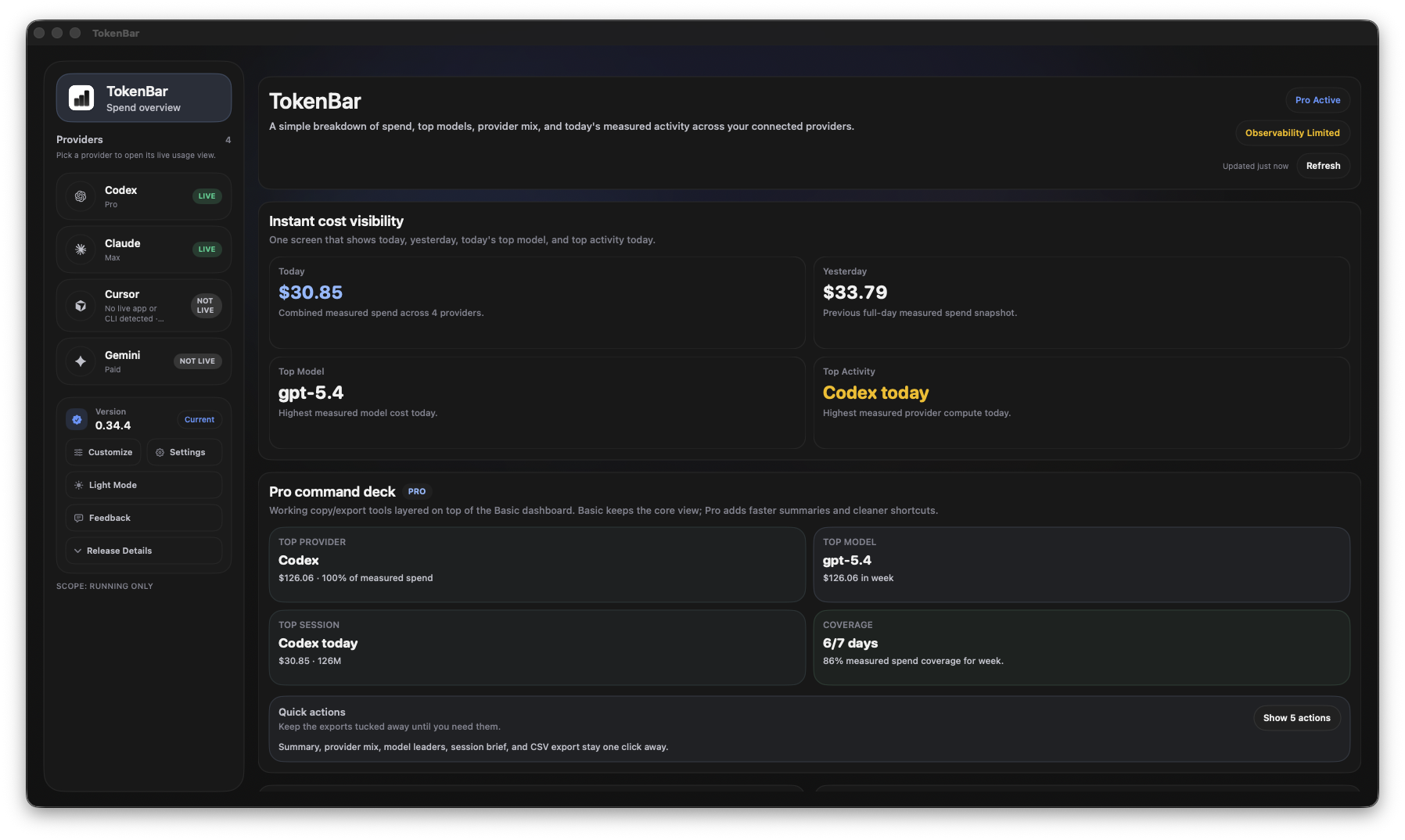
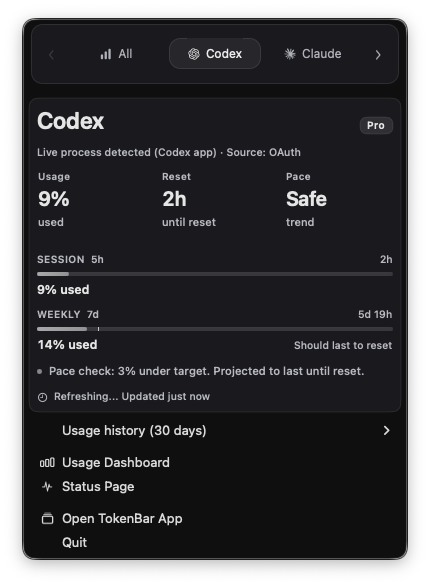
Real TokenBar screenshots
TokenBar desktop dashboard screenshot
TokenBar menu bar popup screenshot

What This Shows

One quick menu bar glance, then a full desktop breakdown when you want more detail.

The dashboard image stays untouched now. The only thing that changes is the popup timing, so the section reads like the real product instead of a demo layered over the screenshot.

Popup opens in view

The menu bar popup stays quiet at first, then opens once the stage is properly in view instead of firing instantly.

No fake overlays

The dashboard screenshot stays clean and readable. Nothing is pasted over the metrics anymore.

Real product motion

The only animation is the popup reveal and a light stage drift, so the section still feels polished without inventing fake states.

Where Spend Starts

Most surprise usage starts with something small.

For most people, the problem is not heroic scale. It is a few extra tries, a longer chat, or a second AI app quietly adding to the day. TokenBar helps because it keeps those changes visible early.

Catch the jump before it becomes a surprise.

Small shifts that add up

One more try

Easy to miss

A quick retry or minor tweak can quietly add more usage than expected.

Longer reply

Adds up

A bigger answer can push the total up even when it feels like the same task.

Second app open

Same day

Using another AI tool in the same afternoon can change the spend faster than you expect.

What usually happens later

By the time the total is obvious, the moment is gone.

Billing pages update later

By the time the total is clear, the reason usually is not.

Totals blur multiple apps together

You can see the spend changed without seeing what actually caused it.

A few retries look harmless

Several small requests can add up faster than expected.

Works With The Apps You Already Use

One simple view across the AI tools already in your day.

Most people are not juggling ten dashboards. They just want one place to check usage, credits, and resets across the two or three AI tools they use most.

Everyday useNo extra dashboardEasy to glance

Apps already in your day

Not another dashboard. One place to check usage.

OpenAI, Claude, Gemini, and supported editor activity stay easier to read together than across separate billing pages.

Chats, API usage, and everyday AI work

See usage change as it happens instead of piecing it together later.

Longer replies and longer conversations

Claude usage stays readable as chats expand instead of melting into a later total.

Gemini

Quota windows and direct usage

Usage and reset timing stay nearby without bouncing between separate pages.

Supported editor help and related provider usage

If you use AI inside your editor, supported activity is easier to keep in view. Coverage still depends on the integration and routing.

Also works with OpenRouter, Vertex AI, OpenCode, Factory, Augment, Amp, JetBrains AI, Kiro, Warp, z.ai, Kimi, Kimi K2, MiniMax, Ollama, and other supported tools people use alongside the main providers.


Social Proof

Loved by thousands.


Why It Feels Useful Fast

The product should feel simple the first time you use it.

Easy visibility, local-first defaults, and straightforward pricing are the reasons TokenBar makes sense quickly. The page should feel that way too.

Easy to checkPrivate by defaultStraightforward pricing

Quick visibility

See usage change while it still means something.

The value is simple: when the number moves, you can still connect it to the app or habit that caused it.

Live usage view

One place to check what is changing right now.

Live view

Usage jumps

Unexpected growth shows up early instead of becoming a later surprise.

App activity

Supported apps stay easier to read together instead of disappearing into a single total.

Extra retries

Repeated requests are easier to spot while the cause is still fresh.

Usage jumps show up early
Repeated sends stop hiding inside a single total
Supported app activity stays readable in one place
Notifications flag surprises before they snowball

Local-first

Private signal, not another cloud dependency.

Usage analytics stay on your Mac where possible. That matters because this should feel like a small utility you can trust, not another service you have to wire into your day.

Usage details stay on your Mac where possible
No hosted analytics layer required
Simple enough to trust quickly

Pricing

Basic $5 or Pro $10

Choose the version that matches how much you want from the app. The pricing stays small, clear, and easy to scan, and Pro stays a one-time $10 lifetime purchase.

Basic

Core plan

$5

Core TokenBar access

Simple Basic plan

Single-device license

Pro

Premium plan

$10

Everything in Basic

$10 lifetime purchase

No subscriptions or recurring charges

Premium dashboard tools, provider mix, and richer insights

Basic starts at $5
Pro is $10 lifetime
No subscriptions or recurring charges on Pro

Trust Signals

The site should answer the credibility questions quickly.

Instead of vague hype, TokenBar should make the product, operator, pricing, and best-fit user obvious fast enough that people do not need to decode the marketing.

Basic $5 or Pro $10Aura Technologies LLCTerms + privacy publishedDirect macOS download

Why it matters

What TokenBar actually is

The site should define TokenBar plainly as a macOS menu bar app for AI usage visibility with a clear job and a clear product boundary.

macOS software
AI usage monitor
Built for everyday AI use
Read the about page

Why it matters

Clear operator and support details

TokenBar is sold by Aura Technologies LLC, with public legal pages, clear pricing, and a direct support address linked from the site.

Aura Technologies LLC
Public support email
Published terms and privacy
Open trust page

Why it matters

Specific product definition

The strongest trust signal is specificity: clear pages for features, pricing, install flow, provider coverage, and the everyday questions people ask before buying.

Feature pages
Pricing clarity
Setup and product fit
See the product definition

Use Cases

Different AI tools, same question: where is the usage going?

Some people start with OpenAI, some with Claude, some with Cursor. Usually they are trying to answer a simpler question: what is adding up, and do I need to pay attention right now?

OpenAI and Codex

Keep OpenAI and Codex usage easy to spot during the day.

TokenBar keeps changes visible in your menu bar so you do not have to wait for a later total.

Catch unexpected jumps earlier
See repeated requests before they blur together
Check usage without opening another dashboard

Claude usage tracking

Keep Claude usage readable as chats get longer.

Longer replies and mixed-provider use are easier to follow from one glanceable view.

Notice longer chats before they turn into a vague total
Keep Claude usage close to the rest of your AI usage
Check changes without bouncing between pages

Cursor and editor support

Keep supported Cursor and Copilot activity easier to notice.

If you use AI inside your editor, TokenBar helps keep that supported activity from fading into the background.

Keep supported editor activity in the same view as API usage
Notice background requests before they quietly stack up
See editor-related usage without opening more dashboards

How It Works

Install it once.Keep a simple view after that.

The product should feel lightweight to adopt and easy to keep around. This section should read like a straightforward routine, not a bigger system to manage.

Basic $5 or Pro $10Local-first where possibleBuilt for the menu bar

Daily rhythm

Leave TokenBar in the menu bar and glance at it when something feels off. It should feel closer to a utility than a new routine.

Step 01

Install TokenBar

Setup stays short.

Drop the macOS app into your menu bar once. The setup is intentionally short so the useful part starts immediately.

Step 02

Connect the providers you already use

OpenAI, Claude, Gemini, and more.

Connect the AI apps and providers you already use. The point is to check usage without rebuilding your habits around a new dashboard.

Step 03

Keep it nearby while you work

Useful at a glance.

Glance at usage, credits, resets, and alerts while things are still changing, so the number still makes sense when you look at it.

What this adds up to

Fast setup, easy checks, simple pricing.

The story lands better when it stays simple: install it once, keep it nearby, check it when you need it.

Basic $5 or Pro $10
Local-first where possible
Built for the menu bar

FAQ

Clear answers beat vague product claims.

These questions cover what people usually want to know before installing TokenBar: who it is for, what it supports, how pricing works, and why keeping usage nearby is useful.

Ask Your AI

Ask TokenBar in your favorite AI.

Pick the AI you actually use. The preview swaps to match it, and the same question stays ready inside the input before opening the real app in a new tab.

Choose your favorite AI

Prompt: What is TokenBar, and is it useful if I use a couple of AI tools on Mac?

Opens ChatGPT in a new tab and copies the question as backup. Short version: TokenBar is a macOS menu bar app that keeps AI usage, credits, and resets easy to check.

ChatGPTPreview

Ready when you are.

Ask about TokenBarUse your own question and open the real app in a new tab.